An anonymous whistleblowing system is only as anonymous as its installation. OpenWhistle stores no IP address, no time of day and no metadata from attachments. What happens before the server, in the network and in a proxy in front, is the operator's part.
Transparency note
This article is written by the developers of OpenWhistle. Every statement about the software is backed by a file of release 2.4.0. Not legal advice.
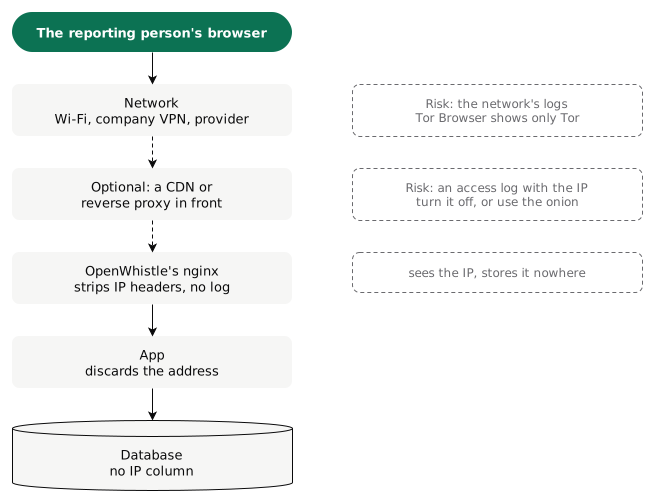
Where the IP address is visible
What OpenWhistle does
| Protection | How |
|---|---|
| IP address, nginx | clears 61 headers, among them X-Forwarded-For and 38 location headers added by CDNs; no access log [1] |
| IP address, app | removes the same headers again and clears the peer address before any handler runs [2] |
| IP address, database | no table has an IP column [3] |
| Access to the report | case number and PIN, no account, no email address; the status session holds only the case id, for 2 hours [4] |
| Time | of the report, messages and files only the date, never the time of day |
| Attachments | GPS data, author and device are removed before anything is stored [5] |
| Content | encrypted, with a key of its own per report [6] |
| Third parties | no font, script or logo from another server; outbound connections are off until you switch them on [2] |
| Warning | if an IP header still arrives, the dashboard, the report page and the status page warn [7] |
The details are in the documentation: anonymity layers, timestamps and outbound requests.
Installation mistakes that break anonymous whistleblowing
| Mistake | Consequence | How to avoid it |
|---|---|---|
| A reverse proxy in front writes an access log | The IP address and time of every report are in the log [8] | turn the log off for this domain; the yellow warning shows that a proxy passes the address on |
| A CDN such as Cloudflare in front | The provider sees every address and passes it on in the CF-Connecting-IP header [9] | decide deliberately; offer an onion address as well |
| The app's or the onion listener's port is reachable past nginx | The headers are not cleared; requests can pose as Tor visitors | open only ports 80 and 443; 8080 stays bound to 127.0.0.1 (onion trust boundary) |
| The report page only on the intranet or via the company VPN | The company's firewall and proxy see who reported and when | make it publicly reachable and point employees to a private device outside the company network |
| Attachments in S3 | The bucket records each file's upload time to the second [10] | use local storage, or restrict access to the bucket tightly |
A database backup together with ENCRYPTION_KEY |
Whoever holds the backup reads every report | keep the key apart from the backup |
| No valid certificate | The browser warns; employees give up or get used to warnings | a certificate from Let's Encrypt (Install) |
Tor: the strongest option
With an onion address, OpenWhistle is reachable only over Tor [11]. The reporting person's network then sees only a connection into the Tor network, and the server sees no address. How to set it up is in Offering an onion address.
What the law requires
In Germany, the identity of the reporting person must be kept confidential (§ 8 HinSchG) [12]. The reporting office “should” handle anonymous reports; the law does not require an anonymous channel (§ 16 Abs. 1). OpenWhistle offers both: anonymous, and confidential with a name.
Check it yourself
The live demo shows the anonymous reporting path. The whole source code is open; every line of this article can be checked there.
Open the live demo →More resources: Removing metadata without altering evidence · Whistleblowing system with EU hosting and GDPR · Step-by-step installation guide
Sources
- OpenWhistle 2.4.0, nginx/snippets/proxy-headers.conf: the cleared headers. Retrieved 27 October 2026.
- OpenWhistle 2.4.0, app/middleware.py. Retrieved 27 October 2026.
- OpenWhistle 2.4.0, app/models/report.py. Retrieved 27 October 2026.
- OpenWhistle 2.4.0, app/api/reports.py: status session, 7200 seconds. Retrieved 27 October 2026.
- OpenWhistle 2.4.0, app/services/attachment.py. Retrieved 27 October 2026.
- OpenWhistle 2.4.0, app/services/encryption.py. Retrieved 27 October 2026.
- OpenWhistle 2.4.0, app/templates/_ip_notice.html. Retrieved 27 October 2026.
- Traefik, Access Logs: the ClientHost field. Retrieved 27 October 2026.
- Cloudflare, Restoring original visitor IPs. Retrieved 27 October 2026.
- Amazon S3, Working with object metadata: Last-Modified. Retrieved 27 October 2026.
- Tor Project, How do Onion Services work? Retrieved 27 October 2026.
- Hinweisgeberschutzgesetz (HinSchG), gesetze-im-internet.de (German). Retrieved 27 October 2026.